
Every property, every room, one screen.
Front desk, reservations, housekeeping, rate calendar and night audit across your whole portfolio — with occupancy, RevPAR and ADR reading off the same folio data your accounts do.
Built for how a hotel actually runs.
Reservations, the front desk, housekeeping and revenue share one set of rooms and rates — so a check-in, a room move and a folio posting all land in the same place.
Multi-Property Portfolio
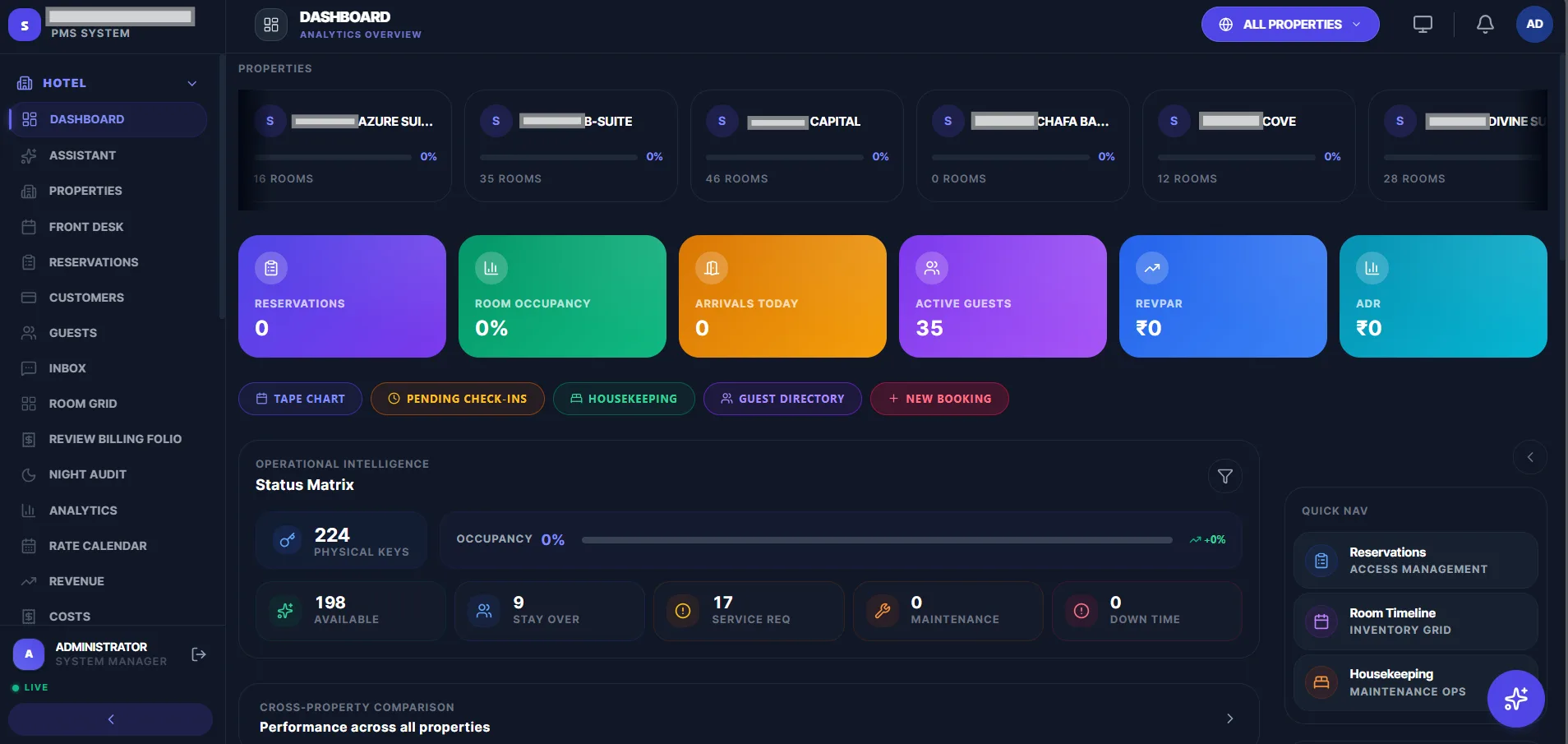
Every property on one dashboard with its own room count and live occupancy — switch to a single hotel or roll the whole portfolio into one view.
RevPAR, ADR & Occupancy
The metrics that actually run a hotel, live on the dashboard: reservations, room occupancy, arrivals today, active guests, RevPAR and ADR.
Front Desk & Tape Chart
Tape chart, pending check-ins, guest directory and new bookings from one bar — the front desk works without leaving the dashboard.
Housekeeping Status Matrix
Physical keys, available rooms, stay-overs, service requests, maintenance and down time in a single operational grid.
Rate Calendar
Season and date-wise pricing per room type, so rates move with demand instead of being edited one booking at a time.
Night Audit & Folio Review
Close the day cleanly — night audit runs the roll-over and the billing folio review catches posting errors before they reach the guest.
See the PMS in action.
One console for the whole portfolio — per-property occupancy, the day's arrivals, the operational status matrix and cross-property performance side by side.
Fits your existing stack.
Channel managers
OTA rate and inventory sync so availability never double-sells
Payments
UPI, cards and payment gateways posted straight to the guest folio
Accounting
Tally, ERPNext and Zoho Books for revenue and cost postings
Communication
WhatsApp and email for confirmations, pre-arrival and check-out
Questions, answered.
Everything you need to know before you move your properties onto it.
That is the point of it. Each property keeps its own rooms, rates, staff and reservations, and the dashboard either filters to one hotel or rolls every property up — including a cross-property comparison so you can see which sites are performing and which are not.
The live operational picture across all rooms: total physical keys, how many are available, stay-overs continuing tonight, open service requests, rooms under maintenance and rooms out of order. It is the one screen a duty manager needs at shift handover.
Both come off actual posted room revenue rather than being entered by hand — ADR against rooms sold, RevPAR against rooms available. Because they read from the same folio data as billing, the dashboard and your accounts do not disagree.
A date-by-room grid of who is in which room and for how long. Front desk uses it to place a walk-in, spot a gap between two stays, or move a guest without opening a single reservation record.
Yes. Rates and inventory sync out to your channel manager and bookings flow back in against the right property and room type, so availability stays consistent and rooms are not double-sold.
Either. A single property typically goes live in 3–5 weeks including room and rate setup. A multi-property group with channel-manager and accounting integration runs 8–12 weeks.
Get started
Ready to run every property from one place?
A walkthrough mapped to your properties, room types, rate seasons and the way your front desk actually works.
Book a Demo